
Automate Shopify Product Publishing with Quality Gates
Go from AI-enriched product data to live Shopify listings without manual data entry. Set quality score thresholds for automated publishing, review and edit before pushing, or bulk-publish hundreds of products at once — with two-way sync keeping your catalog consistent.
Manual Shopify publishing does not scale
Every product you add to Shopify by hand takes 15-30 minutes. Write the title. Copy the description. Upload images one by one. Enter dimensions. Set the price. Add tags. Assign collections. Repeat for every variant.
For a catalog of 500 unlisted products sitting in your warehouse, that is 125-250 hours of data entry — over six weeks of full-time work. Most teams give up halfway through, leaving revenue-generating inventory invisible to online buyers.
CSV import helps with bulk uploads, but it introduces formatting errors, strips image associations, and creates a one-way data flow that immediately falls out of sync. You need a persistent, API-connected pipeline that maintains data quality at scale.
15-30 min per product
Manual entry for title, description, images, variants, tags, and collections adds up fast.
CSV errors and data drift
Spreadsheet imports break image links, mismap fields, and create version conflicts.
Unlisted inventory = lost revenue
Products sitting in your warehouse but not on your website can't generate online sales.
From enriched data to live listing in four steps
Every product follows a clear, trackable pipeline. You control what publishes and when.
Draft
AI enriches your product with descriptions, images, dimensions, and variants from multiple sources across the web.
Pending Review
Edit any field before approving — or set a Data Quality Score threshold to auto-approve products that meet your standards.
Shopify Draft
Products push to Shopify as drafts via the Admin API. Review in Shopify before going live, or skip straight to active.
Shopify Active
Product is live on your store. Two-way webhooks keep Brainova and Shopify in sync as changes happen on either side.
Quality gates prevent incomplete listings
Publishing a product with a missing image, no description, or wrong dimensions hurts your store's credibility and search rankings. Brainova's configurable quality gates ensure nothing reaches Shopify until it meets your standards.
Set the rules once. The system enforces them on every product, every time — whether you are publishing one item or a thousand.
Data Quality Score
Each product receives a score from 0-100% based on completeness and accuracy across key fields. Set your publishing threshold and let the system decide what is ready.
Threshold set to 85% — products below are held for review
Configurable push conditions
Require parent images
Block publishing unless the product has at least one high-resolution parent image uploaded and approved.
Require variant review
Ensure all detected variants (size, color, model) have been reviewed and confirmed before the parent product publishes.
Confidence threshold
Set a minimum AI confidence score for descriptions and specifications. Low-confidence fields get flagged for human verification.
Required fields
Define which fields must be populated — weight, dimensions, brand, category, SEO title — before a product can move to Shopify.
Two-way sync keeps your catalog consistent
Most publishing tools push data one way — into Shopify — and then lose track. Brainova maintains a persistent, bidirectional connection so your product data stays consistent regardless of where changes happen.
Webhook listeners
Shopify webhooks notify Brainova when products, variants, or inventory levels change on the Shopify side. Price updates, stock adjustments, and description edits sync back automatically.
Conflict resolution
When the same field is edited in both Brainova and Shopify, the system flags the conflict for review instead of silently overwriting. You decide which version wins — no data loss.
Real-time updates
Changes propagate within seconds, not hours. When your team updates a price in Shopify, Brainova reflects the change immediately. When you re-enrich a description in Brainova, it pushes to Shopify on approval.
Bulk publish hundreds of products at once
Select a batch of approved products — filter by brand, category, quality score, or status — and push them all to Shopify in one action. The system processes each product in parallel, handling images, variants, tags, and collection assignments simultaneously.
Real-time progress tracking shows you exactly which products are publishing, which have completed, and which hit errors. If a product fails, the rest of the batch continues. No single failure blocks your entire upload.
After the batch completes, you get a summary report: total published, total failed, specific failure reasons, and one-click retry for failed items. It turns what used to be a week of data entry into a five-minute operation.
Batch publishing summary
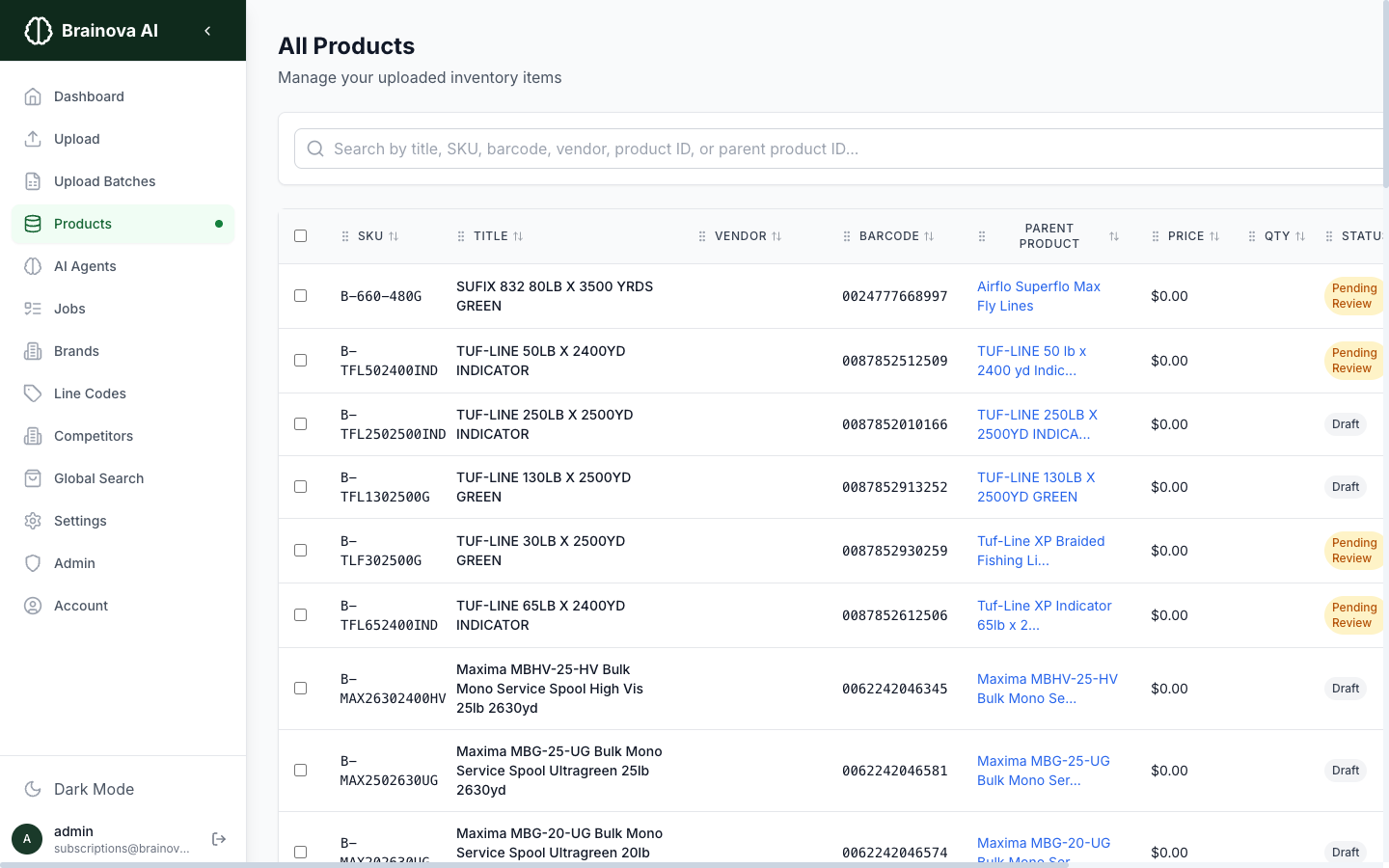
Track every product's publishing status
The products table shows workflow status, quality scores, and Shopify sync state for your entire catalog at a glance. Filter by status to focus on products that need attention.
Frequently Asked Questions
About the Service
Brainova integrates directly with the Shopify Admin API using a secure OAuth connection. You authorize access from your Shopify admin panel — no custom code, no developer required. Once connected, Brainova can push products, variants, images, collections, and tags to your store. The connection takes under two minutes to set up.
Yes, and this is the default workflow. Every product passes through a Draft → Pending Review → Shopify Draft → Shopify Active pipeline. You can inspect and edit every field — title, description, images, pricing, dimensions, tags — before approving. Nothing publishes without your sign-off unless you explicitly enable automated publishing.
The Data Quality Score is a percentage (0-100%) that measures how complete and accurate a product listing is — factoring in description quality, image count, dimension data, variant coverage, and SEO fields. You set a threshold (e.g., 85%) and products that meet or exceed it publish automatically. Products below the threshold queue for manual review. You control the threshold.
Push conditions are quality gates you define before a product can publish to Shopify. Examples: require at least one parent image, require all variants reviewed, require a confidence score above a set threshold, require dimensions populated. If any condition fails, the product stays in review. This prevents incomplete listings from reaching your store.
Yes. Brainova uses Shopify webhooks to detect changes made on the Shopify side — price updates, inventory adjustments, description edits, image changes. When a product is updated in Shopify, Brainova reflects the change so your data stays consistent across both systems. This prevents version conflicts and ensures your product catalog is always in sync.
Getting Started
Brainova supports bulk publishing — push tens, hundreds, or thousands of products in a single batch. The system processes pushes in parallel with real-time progress tracking. If any individual product fails (missing required field, API rate limit), the error is logged and the remaining products continue. You get a summary report showing successful pushes, failures, and reasons.
Failed products are flagged with a clear error message — missing required image, title too long, invalid variant option, API rate limit hit. You can fix the issue in Brainova and retry the push with one click. Failed products never block the rest of a bulk batch — the system continues processing and reports failures at the end.
Yes. Brainova maps standard fields (title, description, images, price, weight, variants) to their Shopify equivalents automatically. For custom data — specifications, certifications, compatibility notes — you can map Brainova fields to Shopify metafields. This ensures all your enriched product data reaches your storefront, not just the basics.
Yes. When publishing, Brainova can assign products to existing Shopify collections (manual or automated) and apply tags based on product attributes. You can define tag rules — for example, auto-tag products by brand, category, or material. Collections and tags sync alongside the product data in the same push.
CSV import is a one-way, manual process — you export a spreadsheet, format columns correctly, upload, and hope nothing breaks. Brainova automates the entire pipeline: AI-enriched data flows through quality gates, publishes via API with error handling, and stays synced via webhooks. No spreadsheets, no formatting errors, no manual uploads. And unlike CSV import, Brainova maintains a persistent two-way connection with your store.
Last updated: