
AI Product Research Automation That Finds What You Need
Brainova's AI product research pipeline automatically searches manufacturer and supplier websites, specialized product databases, and publicly available sources across the open web to find descriptions, images, dimensions, and specifications for every SKU in your catalog. A multi-stage pipeline with intelligent fallbacks achieves an 81% success rate across 3,300+ products — replacing hours of manual research per product with a single click.
Manual product research doesn't scale
For every new SKU, someone on your team opens a browser, searches the brand's website, checks competitor stores, copies descriptions, downloads images, and enters dimensions into a spreadsheet. Each product takes 15-30 minutes. Multiply that by hundreds of new SKUs per month, and product research becomes a full-time job that bottlenecks your entire catalog operation.
15-30 minutes per product
Manual research across manufacturer sites, supplier portals, product databases, and Google for every single SKU.
Knowledge bottleneck
The process depends on one or two people who know the brands, the suppliers, and the product nuances.
Unlisted warehouse stock
Thousands of products sit in your warehouse, not listed online, because research can't keep up with procurement.
Missing dimensions
Physical dimensions — critical for shipping calculators — are rarely available online, forcing educated guesswork.
Multi-stage research pipeline with intelligent fallbacks
Instead of relying on a single search method, Brainova runs multi-stage web research across different types of sources in sequence. If one stage doesn't find a match, the next stage takes over. This layered approach maximizes the chance of finding accurate product data for every SKU.
Manufacturer & Supplier Sources
The pipeline begins by searching manufacturer, supplier, and brand websites for the product using SKU, barcode, or title. This pulls official descriptions, images, and specifications directly from the people who make and distribute the product — the highest-confidence data available.
- Searches by SKU, barcode (UPC/EAN), and title
- Pulls official product data with highest confidence
- Covers 95+ brand and supplier sources
- Returns manufacturer descriptions, images, and specs
Specialized Product Databases
Next, the pipeline searches specialized product databases — barcode, UPC, and EAN lookup services, plus industry-specific catalogs — to cross-reference and validate product information. These databases cover millions of SKUs and catch products that aren't directly listed on supplier sites.
- Barcode (UPC/EAN) lookups across multiple databases
- Cross-references product info across sources
- Catches long-tail SKUs not on supplier sites
- Validates specs, weights, and dimensions where available
Retailer & Competitor Discovery
The pipeline then discovers other retailers and competitors carrying the product through open web search. Every new store discovered is automatically added to your competitor database — so you build competitive intelligence as a side effect of product research, without ever manually entering a competitor.
- Discovers competitor stores via open web search
- Auto-adds discovered stores to your competitor database
- Collects pricing and product data from each match
- Builds competitor intelligence passively over time
AI-Enhanced Deep Web Research
When earlier stages don't find a full match, AI agents perform deep web research across publicly available information. Two modes are available: a deep-research agent that runs thorough multi-step investigations using multiple search strategies, and a quick-search agent for faster results. The system can try deep-research first and fall back to quick-search automatically.
- Deep-research mode for thorough multi-step investigation
- Quick-search mode for faster, direct results
- Title matching and web search across public sources
- Cross-references findings before returning results
Each stage runs in sequence. If a stage finds a match, the pipeline stops and returns the result. If not, the next stage runs automatically.
Supplier Sources → Product Databases → Retailer Discovery → AI Deep Web Research
What you get from every research result
The pipeline doesn't just find data — it scores it, sources it, and tracks it. Every result is verifiable and auditable.
Data Quality Score
Every research result includes a confidence score (e.g., 85%) so you know how reliable the data is. Use scores to prioritize manual review — or set a threshold for automatic publishing.
Source Attribution
Every piece of data includes a direct link to the webpage where it was found. One click to verify any description, image, or specification. Full transparency into where your product data comes from.
Research History
Complete audit trail for every product. See what was found, where it was found, when the research ran, and which pipeline stages returned results. Re-run research at any time to get updated data.
Bulk Research
Research your entire catalog in one click. Select hundreds or thousands of products and start a batch — the pipeline processes them in parallel as background jobs with real-time progress tracking.
Monitor every research batch from one dashboard
The research dashboard shows your pipeline metrics in real time: products found, success rate, active batches, and workflow status. Start bulk research, track progress, and see results — without switching between tools or spreadsheets.
- Real-time pipeline metrics and batch progress
- Workflow status: Draft, Pending Review, Shopify Draft, Active
- Quick actions for common tasks
- Filter and sort by research status, vendor, or confidence
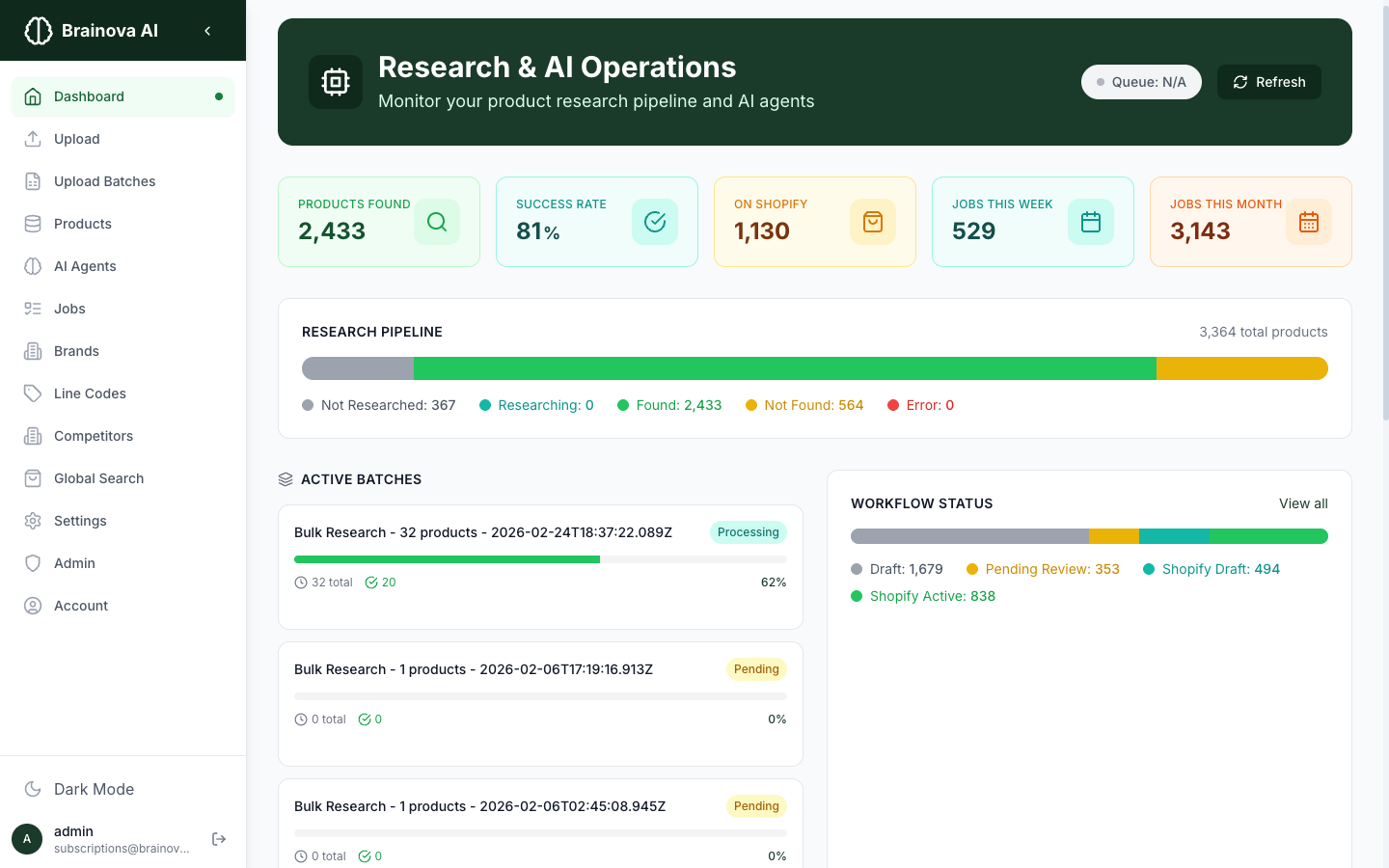
The research dashboard with live pipeline metrics from a 3,300+ product catalog
Research results from a real catalog
These numbers come from a live Brainova AI Inventory deployment managing a catalog of 3,300+ products across 95+ brands.
How retailers use the research pipeline
The research pipeline fits into different stages of your catalog operation — from onboarding new suppliers to enriching existing listings.
New supplier onboarding
A retailer signs a new supplier and receives a spreadsheet with 800 SKUs. Instead of manually researching each product, they upload the spreadsheet, run bulk research, and have descriptions, images, and specs for 650+ products within hours. The remaining products get flagged for manual review based on their Data Quality Score.
Unlisting warehouse backlog
A retailer has 3,000 products in their warehouse that aren't listed online. The research pipeline processes the entire backlog, finding product data for 81% of items across supplier sites, product databases, and the web. Products that meet the confidence threshold are auto-published to Shopify — turning dead stock into live revenue.
Catalog refresh and enrichment
An existing Shopify store has 5,000 listings with inconsistent descriptions and missing images. Running the research pipeline on existing products fills gaps, updates outdated descriptions, and sources higher-quality images from manufacturer and supplier sources — improving listing quality and search rankings across the catalog.
Competitive price monitoring
As the research pipeline discovers competitors carrying the same products, it collects their pricing data automatically. A retailer uses this to identify products where they're overpriced or underpriced relative to the market — adjusting pricing strategy based on real data instead of guesswork.
Research is step one — the pipeline keeps going
Product research feeds into everything else in Brainova AI Inventory. Once the pipeline finds product data, the platform automatically processes it through additional AI stages — writing SEO content, estimating dimensions, detecting variants, and publishing to Shopify.
Competitors auto-discovered during research are tracked for pricing and product overlap.
When research doesn't find dimensions, AI estimates them from product type and catalog data.
Researched and enriched products push to Shopify with one click or auto-publish rules.
See the full platform — import, research, enrich, and publish in one workflow.
Track research status for every product
The products table shows research status for every item in your catalog. Filter by vendor, research progress, or workflow status. Select products in bulk and run research on hundreds of items at once.
- Search by SKU, barcode, or title
- Bulk select and research in one click
- Data Quality Score visible per product
- Draggable column customization
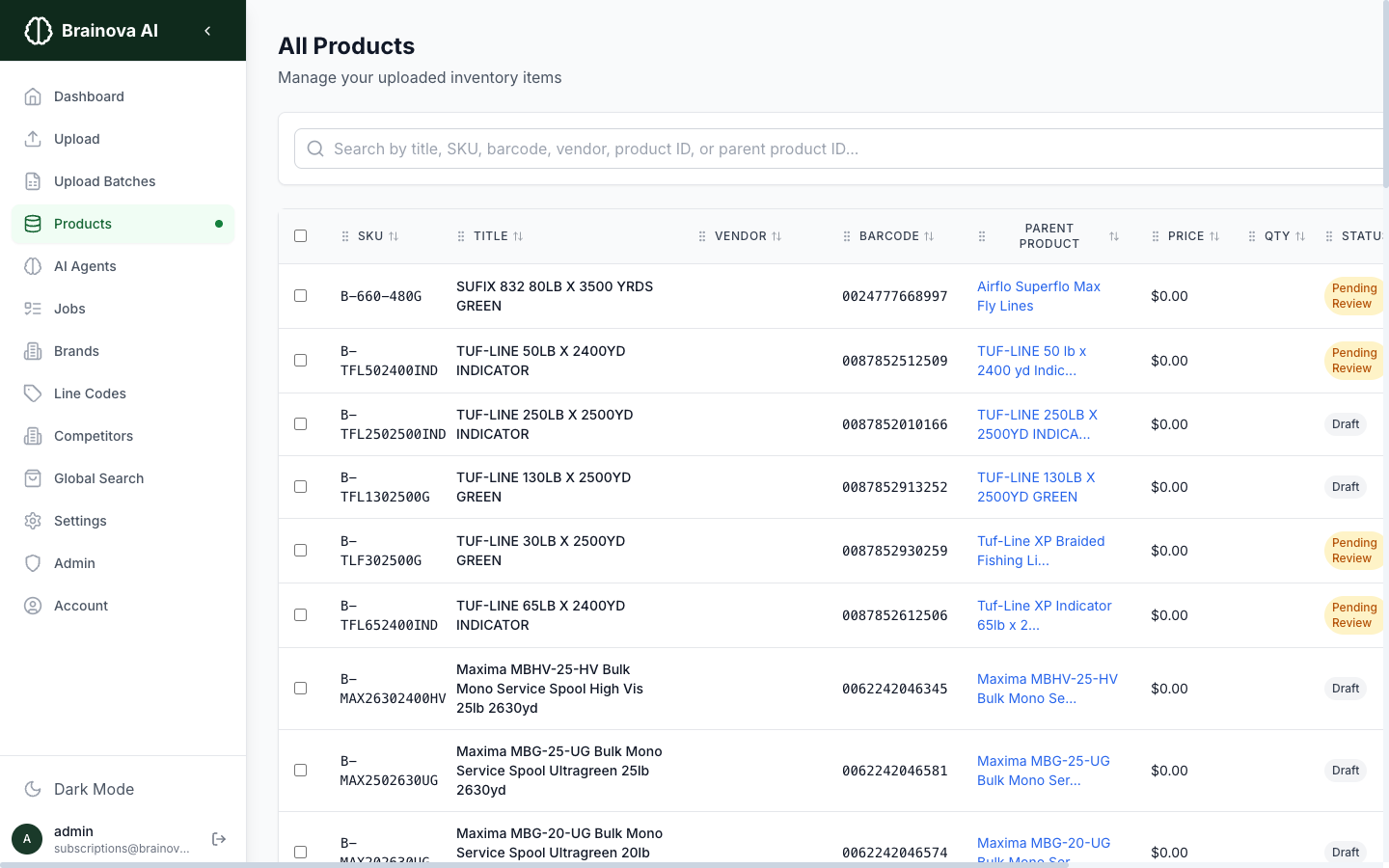
Products table with research status, quality scores, and bulk action controls
Fine-tune how the research pipeline works
Every AI agent in the pipeline is configurable. Choose between deep-research and quick-search modes. Set barcode normalization preferences (UPC-A, EAN-13, or all formats). Define how many competitor matches to find before stopping. Control image resolution requirements and push conditions.
- 7 configurable AI agent types
- Version-controlled prompts and schemas
- Barcode normalization (UPC-A, EAN-13, original)
- Configurable match limits per competitor
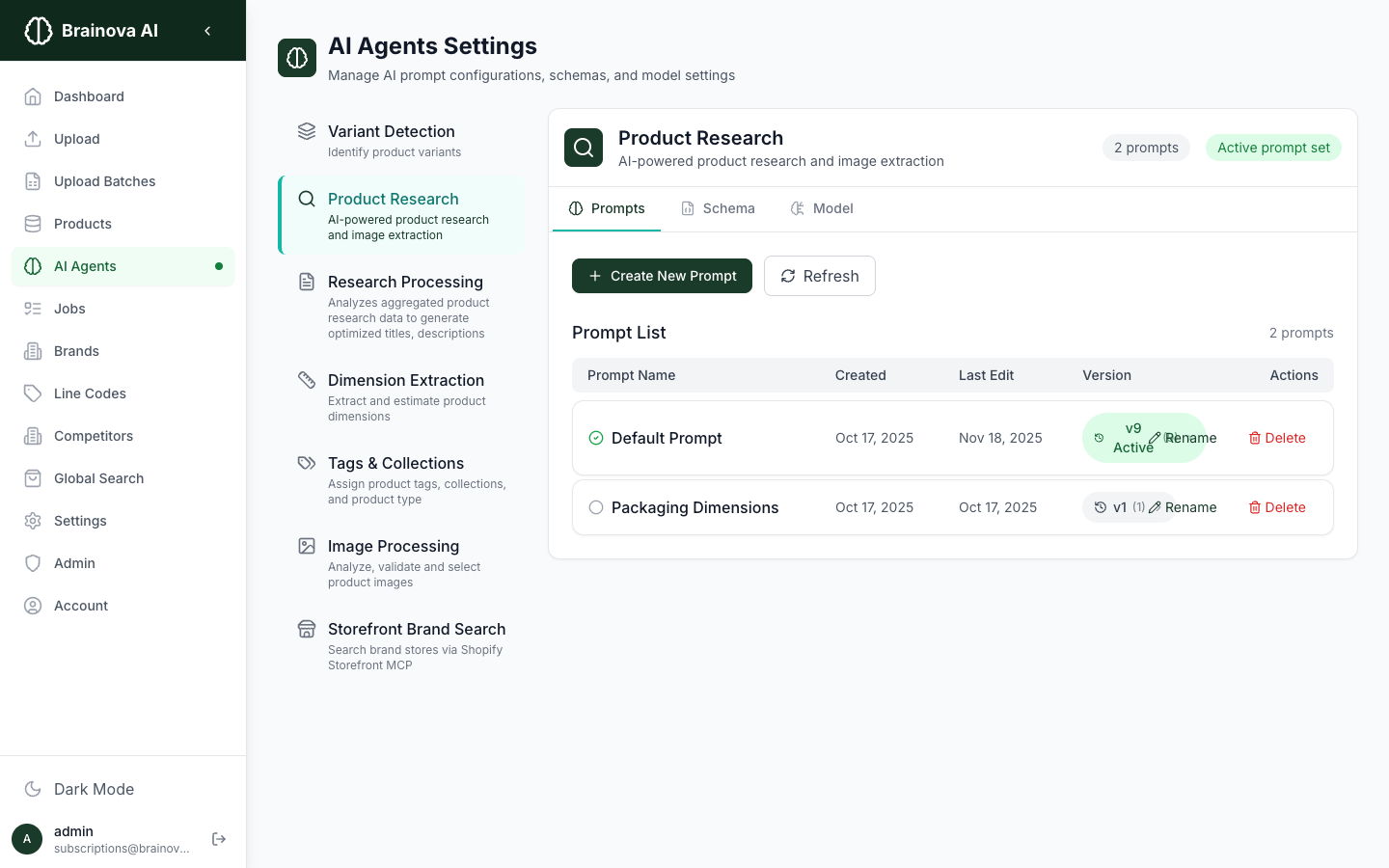
AI agent configuration with customizable prompts, schemas, and processing rules
Frequently Asked Questions
About the Service
Brainova's research pipeline uses multiple stages with intelligent fallbacks. It searches manufacturer and supplier websites first, then cross-references specialized product databases (barcode/UPC/EAN and industry catalogs), then discovers retailer and competitor stores through open web search, and finally runs AI-enhanced deep web research across publicly available sources. Each stage builds on the last, maximizing the chance of finding accurate product data.
A Data Quality Score is a confidence percentage assigned to each research result — for example, 85% confidence. It reflects how closely the found data matches your product based on SKU, barcode, title, and brand. Higher scores mean higher confidence. You can use the score to prioritize manual review or set a threshold (e.g., 85%+) for automatic publishing to Shopify.
The pipeline searches for product descriptions, images, physical dimensions, specifications, pricing, and availability. It pulls official data from manufacturer and supplier sources when available and supplements it with data from specialized product databases, retailer listings, and publicly available web sources. Every data point includes source attribution — a direct link to the webpage where it was found.
Across a live catalog of 3,300+ products, the research pipeline achieves an 81% success rate — meaning it finds usable product data for 4 out of 5 items. Accuracy varies by product type and brand: products with barcodes and established supplier sources see higher match rates. Every result includes a Data Quality Score so you can verify accuracy before publishing.
Yes. Select any number of products — 10 or 10,000 — and start a bulk research batch with one click. The pipeline processes products in parallel as background jobs. You can monitor progress in real time from the dashboard, and the system continues researching even if you close the browser.
Getting Started
Deep-research mode runs a multi-step investigation using multiple search strategies — barcode lookups, title matching, and web search — validating results at each step. It takes longer but is more thorough. Quick-search mode performs a direct lookup and returns the first strong match. You can configure the system to try deep-research first and fall back to quick-search automatically.
During the retailer and competitor discovery stage, the pipeline searches the open web to find stores carrying your products. When it finds a match at a new store, that store is automatically added to your competitor database. Over time, this builds a comprehensive competitive intelligence profile without any manual competitor entry.
If all four stages fail to find a match, the product is flagged as "not found" with a low Data Quality Score. You can re-run research later (new sources are indexed regularly), manually enter data, or adjust search parameters. The system never publishes products it can't verify — unfound items stay in draft status until resolved.
Every piece of data the pipeline finds — descriptions, images, dimensions, prices — is tagged with the URL of the source webpage. In the product detail view, you can click any source link to see the original page where the information was found. This makes verification fast and gives you confidence in the data before publishing.
Yes. The pipeline supports UPC-A, EAN-13, and original barcode formats. You can configure barcode search normalization to search using the original barcode, UPC-A normalized format, EAN-13 normalized format, or all three simultaneously — maximizing match rates across different product databases.
Last updated: